OpenSSH has a fix for a login flaw that attackers began testing within hours of its release. The bug is nicknamed “sshole” and tracked as CVE-2026-123158. Upgrading to OpenSSH 10.6p2 or your vendor’s patched package closes it. A one-line settings change can also block it while you schedule the update.
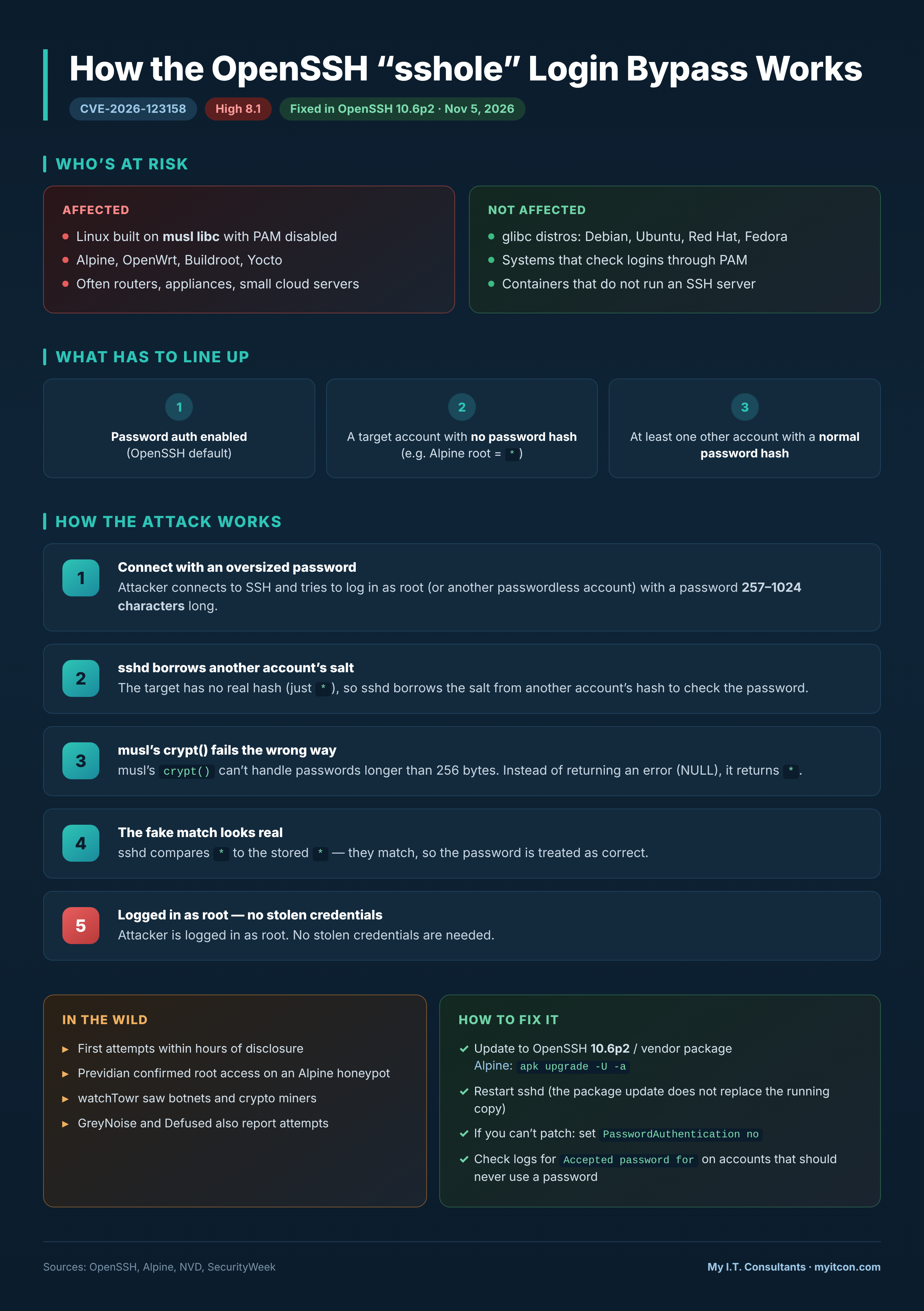
The flaw is narrower than the headlines suggest. It affects OpenSSH servers on Linux systems built with the musl C library instead of the more common glibc. PAM, the usual login-checking framework, must also be turned off. Alpine Linux ships its standard SSH server that way. OpenWrt, Buildroot and Yocto builds can match the same pattern. Those systems often sit inside routers, appliances and small cloud servers.
Several conditions must line up for an attack to work. Password logins must be allowed, which is the OpenSSH default. The machine needs an account with no password set, such as root or a key-only user. At least one other account must have a normal password. An attacker who can reach the SSH port can then enter the passwordless account with one oversized password. No stolen credentials are needed.
Debian, Ubuntu, Red Hat and Fedora servers use glibc and are not affected. Systems that check logins through PAM are also safe from this bug. Containers that do not run an SSH server are not exposed.
The OpenSSH and Alpine fixes arrived on November 5. Threat intelligence firm Previdian saw its first exploitation attempt less than nine hours after the CVE was published. Previdian also confirmed root access on one of its Alpine honeypots. watchTowr reported attacks from botnets and crypto miners. GreyNoise and Defused have reported attempts as well. The flaw carries a High severity score of 8.1.
Here is a practical checklist for this week:
- List every Alpine or other musl-based Linux system that accepts SSH from the network.
- Update OpenSSH to 10.6p2 or the vendor’s patched package. On Alpine, run
apk upgrade -U -a. - Restart the SSH service afterward. The package update does not replace the copy that is already running.
- If you cannot patch today, set
PasswordAuthentication noand restart SSH. Test a key-based login in a second session first. - Search the system logs for “Accepted password for” entries on accounts that should never use a password.
- Review new users, authorized SSH keys and root-level activity on any host that looks suspicious.
A login you cannot explain means that machine should be treated as compromised. Rebuilding it from a clean, patched image is safer than cleaning it in place.
Chandler businesses can ask veteran-owned My I.T. Consultants for a Free Assessment of their East Texas network and servers. Call 903-675-5431 Monday through Friday from 7:00 a.m. to 6:00 p.m.
Want help with this at your business? See Cybersecurity on our Services page or contact My I.T. Consultants.